This page uses javascript to help render elements, if you have problems please enable javascript.
 
You are now inside the main content area


Understanding Satisfactory Academic Progress (SAP)

As of January 2026, Cal State Fullerton will be evaluating SAP after each term (Fall, Spring, Summer).  This will allow us to offer some students a warning term before they would be required to appeal.  


To remain eligible for Financial Aid funds - grants, work-study funds and student loans — students must meet certain standards in the classroom. In financial aid speak, those standards are called satisfactory academic progress (SAP) for financial aid applicants.

As a student, it is not only important to know what this is, but to also be aware of how it can affect you. Below is an overview of SAP at Cal State Fullerton and how to appeal if you’re not meeting the required standards.

Always remember that if you need help or feel as though you are unable to meet the SAP Standards there may be resources at Cal State Fullerton and within the community that can assist you in improving your situation.

Basic Overview

You need to make satisfactory academic progress (SAP) in order to continue receiving federal student aid, California State aid, and Cal State Fullerton Institutional aid. In other words, you have to make good enough grades, and complete enough classes (credits/units), to keep moving toward successfully completing your degree or certificate in a specified time period.

    • SAP is measured for any student at Cal State Fullerton who applies for financial aid.
    • SAP monitors your academic work in three categories:
      1. GPA
      2. Pace of Progress (units completed vs. units attempted)
      3. Maximum Time Frame (overall units taken towards your degree)
    • SAP is monitored at the end of every semester, once the Registrar's Office has completed their grading and semester-end process.
    • Your SAP status is calculated using your entire academic record from all schools attended, even if you did not receive financial aid.
    • The first time you fail to meet either the Pace or GPA Standard, you will be placed on Financial Aid Warning for your next semester of enrollment. This warning status still allows you to receive aid for that next semester of enrollment, while attempting to correct the deficiency in your GPA and/or Pace.
    • If you fail to meet the standards for two consecutive semesters (Pace and/or GPA), you will be considered Financial Aid Disqualified. You can appeal the loss of eligibility, but approval is not guaranteed.
    • Financial Aid Disqualification has  no impact on  your ability to  register. You may still enroll in classes and pay out-of-pocket or with private loans. 
    • You may regain financial aid eligibility after a SAP / Financial Aid Disqualification by either meeting the standards through your academic work in future semesters OR  by having an approved SAP appeal. 
    • Failing to meet the Maximum Time Frame Standard results in an immediate loss of further aid eligibility. You can appeal the loss of eligibility, but approval is not guaranteed. 

The SAP Standards

SAP monitors your academic progress in three categories: GPA, Pace of Progress, and Maximum Time Frame. SAP is evaluated at the end of every semester, once grades have been finalized and posted.


Cumulative GPA - Qualitative

Students must maintain a cumulative grade point average (GPA) as indicated below:
Terms Cumulative GPA
After the 2nd term 1.50
After the 3rd term 1.70
After the 4th term, Juniors, Seniors, Undergraduates beyond the 5th term, and 2nd Bachelor Degree students 2.00
Credential 2.50
Graduate 3.00

A student enrolled in an educational program for at least two academic years or more -- at the end of the second academic year the student must have a GPA of at least a "C"; which is equivalent to a 2.0.  See Academic Transcript Guide for grade values.  Note: WU grades are treated the same as F grades. 

Pace of Progression: Quantitative

.Measured by comparing the total number of units that you have completed by the total number of units attempted. If your Pace percentage is below 66.67%, you will be considered to not meet the Pace of Progress.

  • Completed Units include the following grades: A, B, C, D, RP, or CR
  • Attempted Units include the following grades: A, B, C, D, RP, CR, W, WU, F, I, NC, and RD, test credits

The first time you fail to meet either the Pace or GPA Standard, you will be placed on Financial Aid Warning for your next semester of enrollment. This warning status still allows you to receive aid for that next semester of enrollment, while attempting to correct the deficiency in your GPA and/or Pace.

To calculate your Pace of Progress, divide the total cumulative earned units by the total cumulative attempted units.

For example:

Pace of Progress: Quantitative
Total Cumulative Earned Units Divided by Total Cumulative Attempted Units = % Percentage Passed or Failed
23 29 79.31% Passed
23 44 52.27% Failed

Important Note : Incomplete, WU, NC, RP, RD, W and F grades count toward attempted, but not completed units. Repeated coursework and transfer units count toward both attempted and completed units.

Maximum Timeframe Program Standards

Federal regulations require that all student complete their academic program(s) within 150% of the stand timeframe of their program.

  1. The maximum time frame for all degrees is based on the number of units required for your academic program. 
  2. All units are counted, even if the student did not receive financial aid. This includes all graded courses, transfer units, repeated coursework, and W, WU, I, NC, RD, RP grades.
  3. Remedial course work is excluded as it does not carry baccalaureate credit
  4.  A maximum of 70 units of transferable credit from a 2-year institution is counted based on CSU and Cal State Fullerton policy
  5. Military credit is excluded
  6. Additional transfer credit may be excluded by request if it cannot be used to meet any Cal State Fullerton degree requirements.

The maximum timeframe is based upon 150% of the minimum number of units required by Cal State Fullerton to complete the degree or credential program in which you are enrolled.

  • Most undergraduate majors require 120 units to graduate; therefore, the standard max timeframe for undergraduates is 180 units (120 x 150%).
  • Courses numbered 500 or higher are considered graduate courses and are weighted at 1.5 times their unit value.
  • Most master's degree study plans require 30 graduate units; therefore, the standard unit cap for master's degree candidates is 67.5 units (30 weighted graduate units x 1.5 = 45 x 150%).


Maximum Timeframe Program Standards
Career Standard Timeframe Max Timeframe (150% of Standard Timeframe)
Undergraduate 120 units 180 units
Credential 30 units 45 units
Graduate 30 units 67.5 units

Some majors and degrees require more than the standard number of units.  See the chart below:

Majors and Degrees Requiring More Than the Standard Number of Units

Degree/Major Max Timeframe
BFA - Art 198
BM - Music 198
BS - Computer Science 197
BS - Engineering 206
BS - Civil Engineering/Environ. 206
BS - Electrical Engineering 206
BS - Electrical Engineering/Systems 206
BS - Engineering/Engineering Science 206
BS - Mechanical Engineering 206
EDD - Educational Leadership 113
MBA - All Others 74
MBA - FEMBA Irvine 101
MPA - Public Administration 94.5
Master's of Fine Arts 135
MS - Psychology/Clinical 113
MS - Counseling-MFT 135
MS - Environmental Studies 81
MS - Nursing Anesthetist 160
MS - Nursing Administration 94.5
MS - Nursing EL/MSN 180
MS - Nursing Family Nurse Practitioner 144
MS - Nursing Leadership 94.5
MS - Nursing Woman's Health Care 122
MS - School Nursing 124
MS - TESOL 92
Teaching Credential 51
2nd Bachelor's degree 232


SAP Evaluation and SAP Statuses

SAP is monitored at the end of every semester, once grades have been finalized and posted. You will receive an email notification after each evaluation notifying you of the results and your SAP status.

SAP Statuses

SAP Statuses Information 

SAP Status

Description

Action Options

Impact on Aid Eligibility

Meets SAP

The student met all SAP Standards

No Action Required

Eligible for Aid

Warning

The student did not meet one or more of the SAP Standards (GPA and/or Pace) after a semester of Meets SAP.

No Action Required


Warning Status is for next semester of enrollment.

Eligible for Aid

Not Meets SAP

(Financial Aid Disqualified)

The student did not meet one or more of the SAP Standards (GPA and/or Pace) after a Warning Semester

OR

Student has exceeded the Maximum Time Frame after a semester of Meets SAP

Submit an Appeal

OR

Continue to enroll without aid & work to improve SAP Status through academic work.

Not Eligible for Aid

Probation

(Financial Aid Probation)

SAP Appeal Approved

Probation status is for next semester of enrollment.

Eligible for Aid

Not Meets SAP

(After Probation Semester)

The student did not meet one or more of the SAP Standards (GPA and/or Pace) after the Probation Semester

Submit an Appeal that may include an Academic Plan. (Plan to ensure academic success)

OR

Continue to enroll without aid & work to improve SAP Status through academic work.

Not Eligible for Aid

Probation


(Financial Aid Probation with Academic Plan)

SAP Appeal with Academic Plan Approved

Probation status is for next semester of enrollment.


Follow Academic Plan requirements.

Eligible for Aid

Meets SAP

(with Academic Plan)

The student is on an Approved Academic Plan as part of the last SAP Appeal.  Although not meeting the SAP Standards, the student is adhering to the terms of the Plan.

Follow Academic Plan requirements.

Eligible for Aid

Not Meets SAP

Financial Aid Disqualified
(Did not Adhere to Academic Plan)

The student was on an Approved Academic Plan as part of their previous SAP Appeal.

Submit an appeal

OR

Continue to enroll without aid & work to improve SAP Status through academic work

Not Eligible for Aid


Reinstatement of Financial Aid/Regaining Eligibility

If you fail to meet the SAP requirements and have a SAP Status of "Not Meets SAP," you will have financial aid eligibility reinstated when you meet all three SAP standards, or you submit a SAP Appeal that is successfully approved. 

Just paying out of pocket for classes or sitting out a semester is not grounds for reinstatement of your aid. You must bring your academic progress back into compliance or have an appeal approved to have aid eligibility reinstated.   

SAP Not Meets and Aid Eligibility

SAP and Financial Aid Disqualification has no impact on your ability to register.  You may still enroll in classes and pay out-of-pocket or with private loans.  

You may regain financial aid eligibility after a SAP Disqualification by either meeting the standards through your academic work in future semesters by having an approved SAP appeal.

Students with a status of Not Meets SAP may appeal their status to the Office of Financial Aid.  An appeal must be based on extenuating circumstances. 

SAP Appeal Information and Instructions

Students with a status of Not Meets SAP may appeal their status to the Office of  Financial Aid.


SAP Appeal Information

An appeal must be based on extenuating circumstances. Supporting documentation may be requested and/or required as part of your appeal (depending on your circumstances).  Circumstances for appeals include, but are not limited to: 

  • Illness, accident, or injury experienced by you or a significant person in your life
  • Death of a family member or significant person in your life
  • Divorce experienced by you or parent
  • Significant trauma in your life that impaired your emotional and/or physical health
  • Loss or change in employment
  • Pregnancy or birth of a child (or adoption)
  • Loss of, limited access to, or difficulty finding, childcare
  • Homelessness or difficulty in securing reliable housing
  • Limited or loss of access to personal or public transportation
  • Impacts from a Natural Disaster
  • Change of Major*
  • Other significant unexpected and documented circumstances beyond your control.

*Note:  Double majors or attempting a minor are not viewed as extenuating circumstances, since the standard is quite generous in the time frame allowed to complete a degree.

To appeal your failure to meet SAP due to any of these or similar personal issues, create and submit the SAP Appeal using Student Forms.

In your appeal, you must add a statement including the following: 

  • Explanation of What Happened and When:
    • Why you were unable to meet the SAP Standards?
    • What term was affected?
      • Be sure to address the original term of F and/or W grades forward even if it's three or four terms before not meeting Pace or GPA.
  • Explanation of What Has Changed:
    • What has changed?
    • What corrective measures you have taken, or will take, to be successful in the future?

Follow these steps to provide a successful SAP appeal to the Office of Financial Aid. 

  1. Be aware of key deadlines, including cancellation, disenrollment, tuition/fee refund dates, and SAP Appeal deadline etc.
  2. Type Your Appeal statement: Your letter of explanation should include the extenuating circumstances that prevented you from meeting financial aid SAP requirements and steps you have taken to ensure your academic success. If you did not meet the requirements of your prior SAP appeal and would like to be reconsidered for financial aid, your new letter of explanation must include a detailed statement explaining why the steps you outlined in the prior appeal did not work. 
  3. Give Examples: In your letter, include changes you will make and/or resources you will use to ensure your future academic success (e.g. EOP advising, counseling, tutoring, reduce work hours, etc.). Include  an explanation of what has changed in your circumstances that will enable you to meet SAP. 
  4. Gather Documentation's (If available). Documents you may submit to support your letter of explanation are (e.g. medical documentation, pay check stubs, transcripts, etc.).
  5. Meeting with an Academic Advisor Recommended: Meet with an advisor if you have concerns and need additional help and guidance.
    • Additional documentation or explanation may be requested by the committee members before a decision is rendered.
  6. Prepare a Backup Plan:  If your appeal is not approved, you may need to seek alternative enrollment options or sources of funding.
  7. Expect approximately to wait 4 to 6 weeks for your appeal to be reviewed. You will be notified of the committee’s decision via email.

Approved Appeals

If your appeal is approved, you will be placed on Financial Aid Probation for your next semester of enrollment.

  • Make sure you understand what successful completion means and the numbers of units you must complete each semester to maintain you financial eligibility. 
  • If your approval included an Academic Plan and you are considering a change in your course load, you might want to discuss your academic plan options with both your academic advisor prior to making any adjustments to your schedule.
  • Read your approved SAP Appeal to make sure you are following any approval requirements to maintain financial aid for the academic year you submitted your appeal.
  • By signing and submitting the SAP appeal form you acknowledge your understanding of the basic requirement on that form, including any additional requirements from your approved SAP appeal. 

At the conclusion of your Financial Aid Probation term, you must be meeting Cal State Fullerton's SAP standards in order to remain eligible for further financial aid. 

NOTE:  Receiving a grade of F, W, WU, I, NC or RD during your Financial Aid Probation semester will most likely cause you to not meet the SAP Standards at the end of your Probation term.  

Denied Appeals

If your appeal is denied, you will not be eligible for financial aid until you are able to meet the SAP Standards based on your academic work in future semesters. 

Appeal of Denial  (2nd Level Appeal)

If you wish to challenge the denial of your appeal, your challenge must be submitted in writing to the Associate Director of Financial Aid, Kellye MacLeod. 

Contact information for Kellye MacLeod

kmacleod@fullerton.edu

800 N State College Blvd, GH 146

Fullerton, California 92830

You must provide a clear written statement with the rationale for your challenge of the denial.  The deadline to submit your statement is two weeks from the date of notification.

The Associate Director of Financial Aid will consult with the Director of Financial Aid as appropriate in evaluating, and responding to, your challenge. 

Maximum Timeframe Appeals

The Maximum Timeframe Appeal process is available for you to request a continuation of financial aid eligibility until you complete your degree.

In general, the appeal is considered only if:

1. You are within 1-2 semesters of completing your program;

2. Your academic performance at Cal State Fullerton has been acceptable; and

3. You have extenuating circumstances for attempting excess units.

The following reasons may be documented for having attempted excessive units:

  • DOUBLE MAJOR/MINOR: In general, adding a second major or a minor after you have already attempted 120 units is not an acceptable reason for extending the unit cap. If you declared a second major or minor prior to 120 attempted units and you have been making progress toward your degree, you may submit this appeal. Be sure to have each academic department determine your remaining required units.
  • FIRST CHANGE OF UNDERGRADUATE MAJOR: In general, making multiple changes of major, particularly after you have already attempted 120 units, is not an acceptable reason for extending the unit cap. If you changed your undergraduate major for the first time and you have been making progress toward your degree, provide an explanation and be sure to have each academic department determine your remaining required units.
  • SECOND BACHELOR’S DEGREE: If you are enrolled in a second bachelor’s degree program, have your academic department determine your remaining units.
  • PREREQUISITES FOR MASTER’S PROGRAM: If you are pursuing a master’s degree in a field different from your undergraduate program, obtain a statement from your academic department indicating the total number of prerequisite units you were required to complete in addition to the program requirements.
  • OTHER EXTENUATING CIRCUMSTANCES: If you attempted excessive units before transferring to California State University, Fullerton and a large number of these units do not apply to your degree program, explain the circumstances and have your academic department determine your remaining required units.

Please note:  You can not receive financial aid for courses that are not required for your current program.


How to Submit your SAP Appeal 

StudentForms allows you to submit documents electronically to CSUF, Office of Financial Aid.

Please review the following steps before continuing to StudentForms.

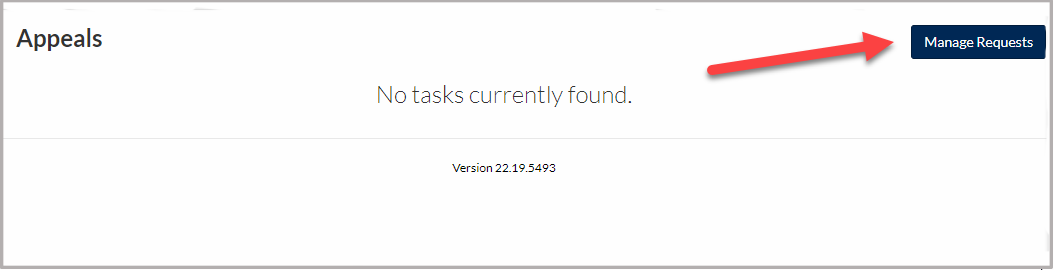
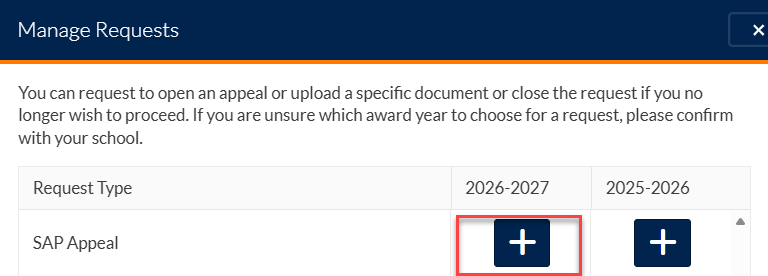
1. You will need to register with your student information before requesting a SAP Appeal. Once you are logged on, you may request the appeal by selecting the "Manage Requests" button.

select manage request

select plus line

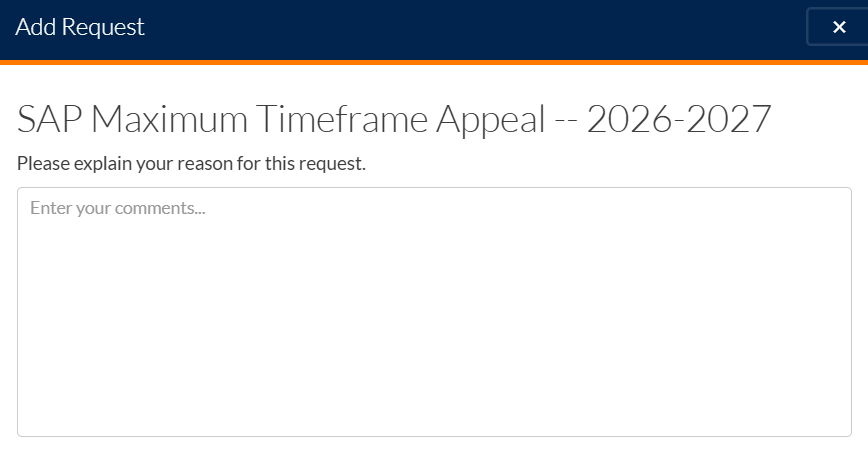
2.  When requesting a SAP Appeal, please specify the term, and SAP standard(s), you are appealing. Review SAP standard(s) in your letter regarding your Academic Progress.
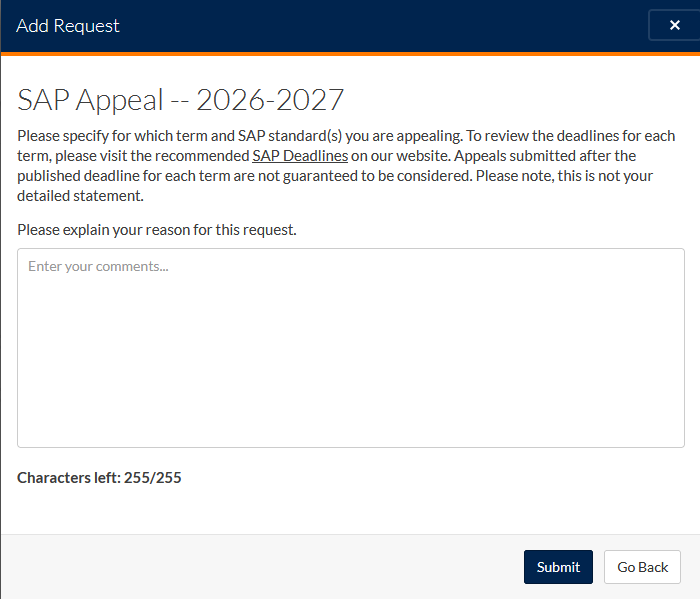
type reason for SAP

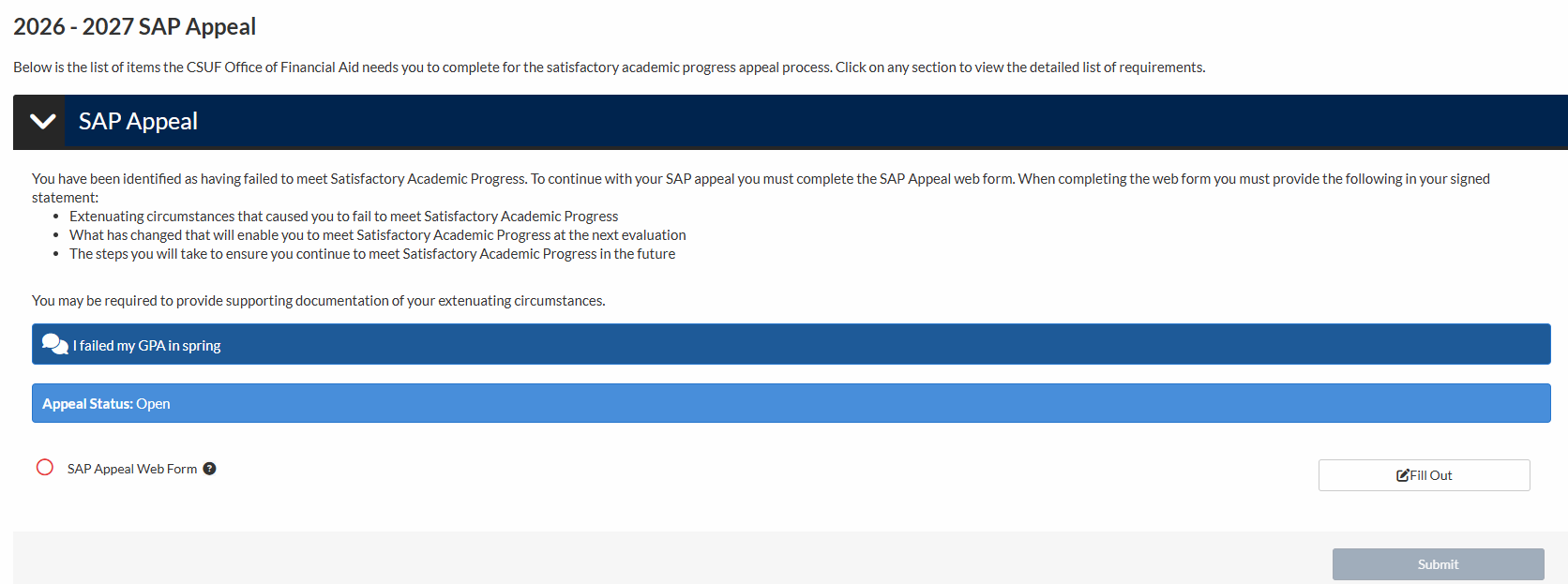
3.  Once you have submitted the request, you will see the documents needed before completing the appeal submission process. Please be prepared to complete the following:

     a. SAP Appeal web form that includes a statement*

     b. Third Party Documentation supporting the circumstance noted in the statement*

After we review the appeal, additional documentation may be requested. This additional request may also be labeled as "Third Party Documentation" or "statement."
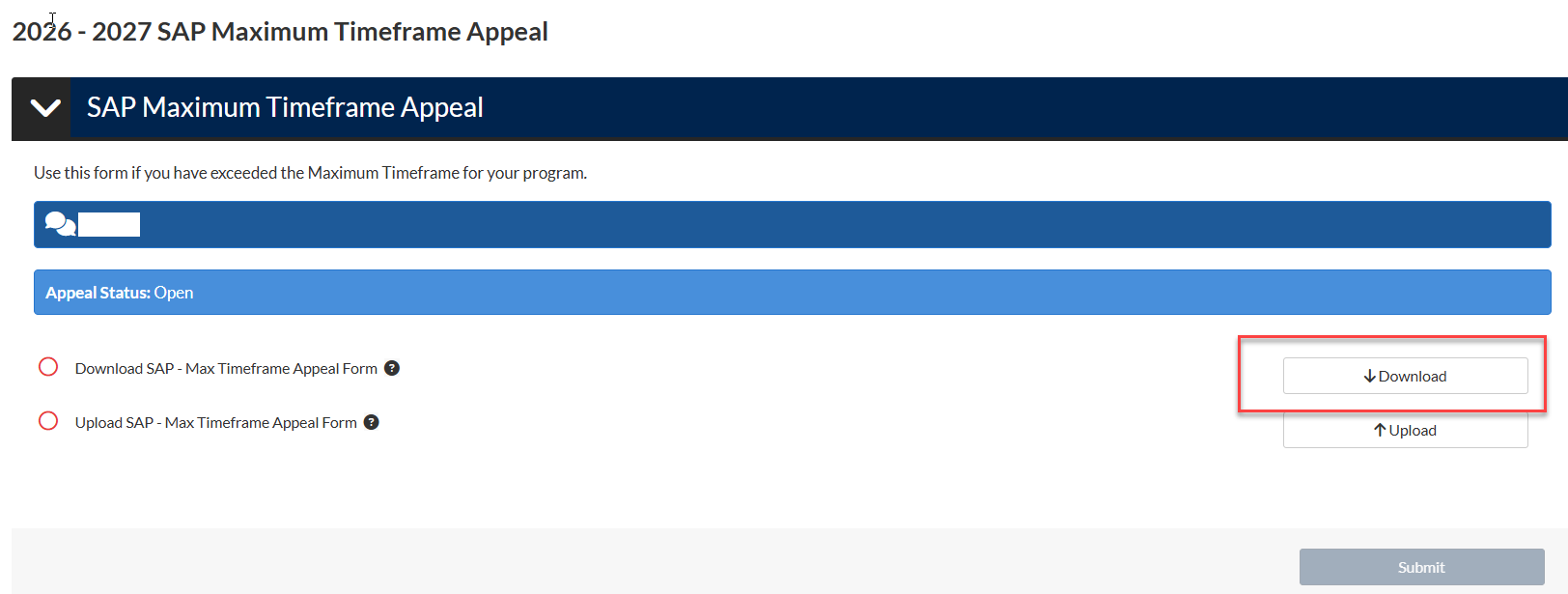
sap appeal web form fill

4.  Once all appeal documents are uploaded, click the "Submit" button, then the "Finish" button. General processing time is between 2 to 4 weeks, but may take up to 6 weeks.

Submit a SAP Appeal in StudentForms


Appeal Deadlines

SAP Appeals are due three weeks prior to the last day of finals for the semester you are trying to get aid for.

Be sure to submit your appeal early, before the start of the term if possible, so you can receive a timely decision allowing you to plan accordingly. 

Appeals may not be accepted after the deadline has passed. If you do not submit your appeal in a timely manner and your appeal is denied after the term has started, you will be responsible for any and all costs incurred, including any costs related to a decision to withdraw from the semester.

  • Fall Semester - November 28
  • Spring Semester - April 24
  • Summer Term - July 17

Appeals received after the term ends cannot be considered for financial aid award or reinstatement.

Academic Plans

There are times when your appeal may require the submission of an Academic Plan.  This generally occurs for the following: 

  • If you are appealing your status after failing to meet SAP during your SAP Probation semester. 
  • If, when reviewing your appeal, it is determined that even if your appeal is approved you will not be able to meet the GPA or the Pace Standard at the end of your Probation semester. 

To develop your plan, you should meet with your Academic Advisor and discuss your circumstances, review your transcript and your goals, and prepare a manageable academic plan that will enable you to be successful academically and to return to meeting the SAP Standards at a specific point in the future.

Following this plan successfully allows you to either regain aid eligibility by meeting SAP standards or by continuing to follow your plan through completion of your program of study.

Progress is reviewed by the Office of Financial Aid at the end of each semester. If, at the end of the semester, you make progress as stipulated in your academic plan, your new SAP status will be Meets SAP (based on your adherence to your academic plan). 

If you are not making progress as stipulated in your academic plan, your new SAP status will change to Not Meets SAP (did not adhere to plan). You will not be eligible to receive aid unless you submit a new SAP Appeal – which must include a NEW Academic Plan.  You may also choose to continue to enroll without aid & work to improve SAP Status through academic work. 


Treatment of Special Courses and Grades

Not all courses and grades are treated the same for SAP calculation

Special Courses and Grades

Repeat Coursework

If you repeat a course, credit hours for each registration will be added to a student’s attempted credit hours total. However, only the most recent grade received in the course will be included in the calculation of the cumulative GPA/qualitative measure.

Note:  Federal Financial Aid will pay for only one repeat of a previously passed course.

Withdrawal from Courses (W)

If a student withdraws from a course during the semester, after the add/drop period (when a grade of W begins to be assigned), the course credit hours will be added to his attempted credit hours total.

Unofficial Withdrawal from Courses (WU)

If a student unofficially withdraws from a course during the semester, the course credit hours will be added to his attempted credit hours total. Additionally, per CSUF academic policy, the grade of WU is included in the calculation of the students GPA (as the equivalent of an F).

Remedial (or Pre-Baccalaureatte) Courses

Credit hours for each remedial course a student takes are included in the calculation of attempted credit hours total in determining pace. Remedial courses are not included in the calculation of the GPA nor the Maximum Time Frame standards. 

Incomplete Authorized (I) Courses

Credit hours for incomplete courses are included in the calculation of a student’s attempted credit hours total, but not in the calculation of the GPA. When a grade is updated, it will be included in the GPA calculation and passing grades will be counted as completed hours.

Incomplete Charged (IC) Courses

Courses with an authorized incomplete (“I”) grade not completed within one year, will be replaced with an (IC) and is counted as a failing grade for grade-point average and grade-point computation and will count as attempted and not completed.

Transfer Credits

Credit hours transferred from other schools that are accepted toward completion of the Cal State Fullerton program count as hours attempted and hours completed. These are also factored into the Maximum Time Frame.

  • A maximum of 70 units of transferable credit from a 2-year institution will be counted based on CSU and CSUF Policy.
  • Units from a 4 year institution are not limited to 70; however, transfer credit may be excluded by request if it cannot be used to meet any CSUF Degree requirements (including general electives).

Audited Courses

Credits are not earned for audited courses. Therefore, they are not included in the calculation of a student’s attempted credit hours total or the GPA Standard.

Report In Progress

The "RP" symbol is used in connection with courses that extend beyond one academic semester. The symbol indicates that work in progress has been evaluated as satisfactory to date but that the assignment of a precise grade must await the completion of additional coursework. 

Courses with a grade of RP will be treated as units attempted and completed in the student’s Pace Standard, but not in the calculation of the GPA.

Report Delayed

The "RD" symbol may be used where a delay in the reporting of a grade is due to circumstances beyond the control of the student. The symbol may be assigned by the Registrar's Office only and, if assigned, shall be replaced by a substantive grading symbol as soon as possible upon submission of a Grade Change Form.

Since no evaluation has been done as to the status of the coursework (satisfactory vs. unsatisfactory), courses with a grade of RD will be included in the calculation of a student’s attempted credit hours total (attempted but not completed), but not in the calculation of the GPA.

Undergraduate Courses at the Graduate Level

Undergraduate courses taken by graduate students do not earn graduate credit, and therefore, they are not included in the calculation of the GPA.  However, credit hours for the courses are included in the calculation of the student’s attempted credit hours total (counted as attempted but not completed).

Changing Majors

If a student changes majors, the credit hours taken under all majors will be included in the calculation of the attempted credit hours total, the GPA calculation and the maximum timeframe for degree completion.  A student may submit an appeal to have any courses taken under the previous major that cannot be applied to their current major excluded from the SAP Standards.


University Resources

The Office of Financial Aid encourages any student experiencing academic difficulties to use resourses available at Cal State Fullerton.  These are valuable resources that can assist you if you are stuggling to maintain Satisfactory Academic Progress.

Resources available for Cal State Fullerton students


left col
right col
 
left col
right col
 
left col
right col
 
left col
right col
 
 
left col
right col
 
 
left col
right col
 
left col
right col
 
left col
right col