This page uses javascript to help render elements, if you have problems please enable javascript.
 
You are now inside the main content area


left col

FAQs

Housing Application Process

right col
 
left col

Find answers to common questions about the housing application, and securing your spot.

right col
 
 
left col

General Housing Information

What is the application process?

New admitted students must accept the university admission offer and pay the $250 enrollment deposit to have access to the Student Housing Portal. The admission process takes 2-4 business days so please plan accordingly.

  • Applications are processed on a first-come, first-served basis as space allows.
    • Housing application is separate from CSUF admissionStudents must accept their admission to CSUF before they can see the housing application
  • Access may take 2-4 business days after admission acceptance and payment of the enrollment administrative charge
  • Students must apply through the CSUF Housing Portal.

HOUSING PORTAL

Important: The $50 application fee is mandatory and non-refundable. Payment must be made using a debit or credit card; we do not accept checks or bank transfers.

What happens after I submit the housing application?

If the applicant completed both parts above as soon as the submission option is available, there is nothing for the applicant to do until they receive a housing offer email. 

Housing offers are sent on a rolling basis

Students must check their CSUF email address daily

Missing an email is not an acceptable reason  for missed deadlines

Offers are only emailed to students

No parents, supporters, or guarantors receive housing emails

The applicant must log into the Student Housing Portal on their assigned room selection period to view the available spaces for room selection and other eligible students if they want to select potential roommate(s). Applicants who do not select a space during Room Selection will not be considered for housing.

What are the different types of housing available?

We offer four styles of housing based on student classification:

  • Incoming First Time First Year (Recent High School Graduates): Residence Halls
    • Shared rooms for 2 or 3 students (double or triple occupancy)
    • Communal bathrooms in the hallway
    • Shared lounge and study spaces
  • Incoming First Time First Years (Recent High School Graduates) & Continuing Students: Suites
    • 4-bedroom, 2-bathroom suites for 8 students
    • Double occupancy rooms
    • In-unit bathrooms
    • Kitchenette
  • Continuing Students: Single Apartments
    • 4-bedroom, 2-bathroom apartments for 4 students
    • Single occupancy rooms
    • In-unit bathrooms
    • Full-size kitchen
  • Continuing Students: Double Apartments
    • 2-bedroom, 2-bathroom apartments for 4 students
    • Double occupancy rooms
    • In-unit bathrooms
    • Full-size kitchen

INFO ON HOUSING COMMUNITIES


right col
 
 
left col
 
 
right col
 
 
left col
right col
 
 
left col

Room Selection and Assignments

View Our How-To Guide

Room Selection Guide

How does the room assignment process work?

Applicants who are moving forward to Room Selection will be notified at their CSUF student email address. They will have an assigned 2 hour timeslot in their offer email to log in to their Student Housing Portal, access Room Selection, and view all available rooms they are eligible for, based on availability. 

Will there still be rooms available during my time slot?

Room availability changes throughout the room selection process as students select rooms. We cannot guarantee what rooms or room types will be available at the time of your selection.

How do roommate groups work?

Students can create roommate groups before room selection.

  • Continuing students can create roommate groups of up to two students
  • First-Time First Years can create roommate groups of up to three students

Can a roommate group be changed?

Yes. Anyone in the roommate group can leave or break up the group before room selection.

Why can I only see certain buildings or room types?

The room options available to you depend on your student classification and eligibility.

Your theme preference and your gender-inclusive housing selection will affect which buildings you can see.

For example:

  • First-Time First Years may have access to residence halls and suites.
  • Continuing or transfer students may have access to suites or apartments.

Why was I placed in a themed community?

Housing assignments and roommate visibility are based on the preferences selected in your housing application, including themed communities and housing options.

What is Gender Inclusive Housing? 

If you indicate that you need Gender Inclusive Housing on your application, you will share a bedroom with people of different gender identities. Gender Inclusive Housing is intended for our residents who feel more comfortable sharing a room, suite, or apartment with individuals holding expansive gender identities or who do not subscribe to the gender binary. A gender inclusive room or suite may include people of any sexual orientation or gender identity, or allies. This includes sharing a bedroom with an individual who has a different gender identity than you.

Gender inclusive housing options are offered in all residential communities for all students.

Gender Inclusive Housing will only be assigned to students who select they need this option.

It is not required to live in Gender Inclusive Housing to live on-campus and saying you need Gender Inclusive Housing does not increase your likelihood of being selected to live on campus.

Please Note: Once you submit your application, you will be unable to edit your Gender Inclusive Housing choice. In order to change this field, you must contact the housing office at housing@fullerton.edu prior to receiving a housing offer. After you receive a housing offer, your selection cannot be changed.

On your housing application, you either selected No, I DO NOT NEED to live in gender inclusive housing, or Yes, I NEED to live in gender inclusive housing. 

right col
 
 
left col

Disability and Special Accommodations

Would my student be given any priority if they are a Disability Support Services (DSS) student?

DSS students still need to complete the same application process as there is no priority for DSS students. Approved disability-related accommodations do not impact your eligibility for housing. 

If a DSS student requires special accommodations, such as wheelchair accessible room and shower, requires single occupancy room for medical reason, the student must speak with their DSS management specialist and have DSS contact the Housing Office.

Steps to Apply for DSS

DSS Housing Accomodations


How do I request disability-related housing accommodations?

If a DSS student requires special accommodations, such as a wheelchair accessible room and shower, requires single occupancy room for medical reason, the student must speak with their DSS management specialist and have DSS contact the Housing Office.

Steps to Apply for DSS

DSS Housing Accomodations


right col
 
 
left col

VIDEO

Housing Application Overview 

Watch our recorded virtual session covering the housing application overview for students.

ajax space
right col
 
 
left col

How To Guide

View and Message Roommates

How to view your room and roommate information on the housing portal, and how to send messages to your assigned roommates

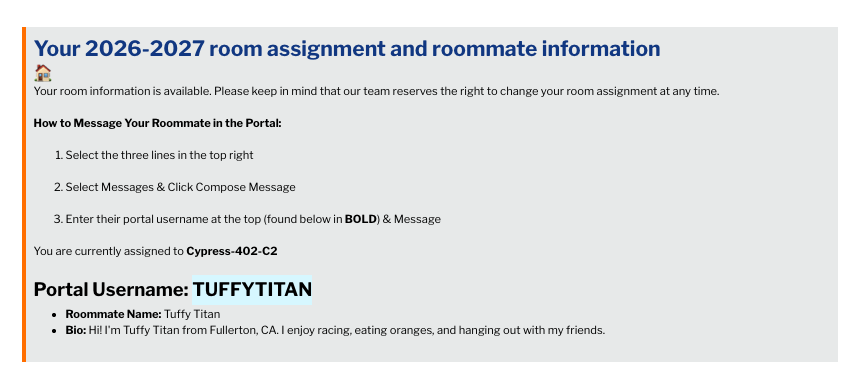
Step 1: Open your CSUF Housing Portal

Your roommate(s)' information & Portal Username is found on the housing portal homepage along with your booking & floor layout information. The portal username is how you will send a message on the portal, so copy the portal username.

message

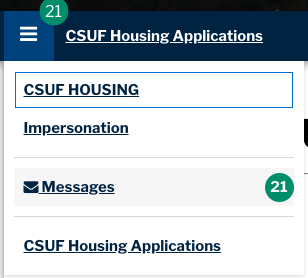
Step 2: Select the 3 lines in the top right & Select Messages

step3

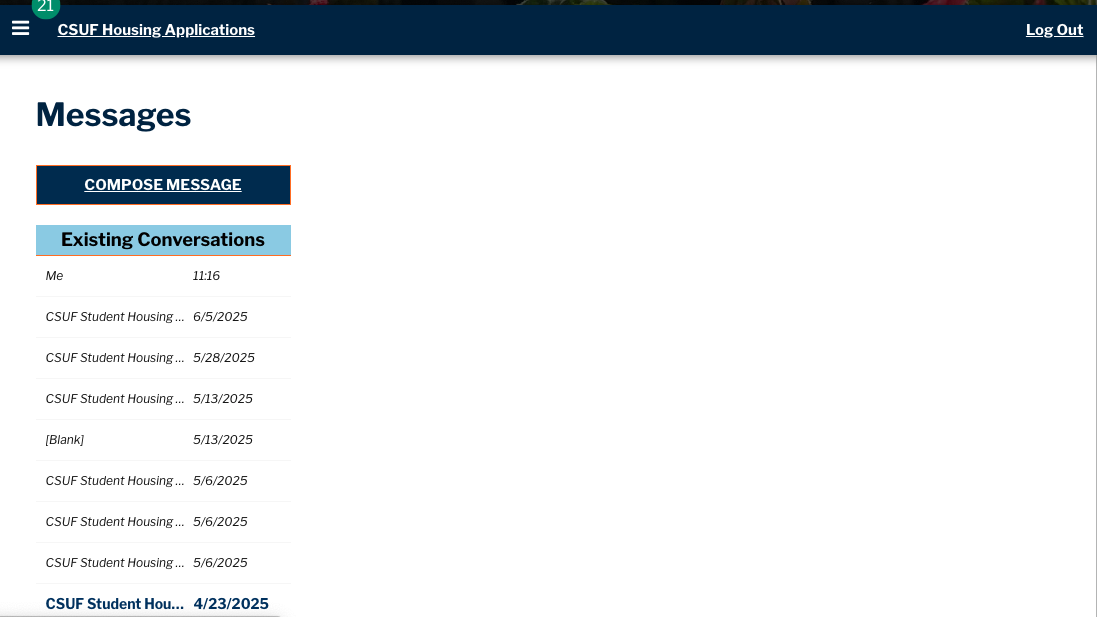
Step 3:  Click Compose Message

Here, you can compose/view messages from roommates and our office. 

step3

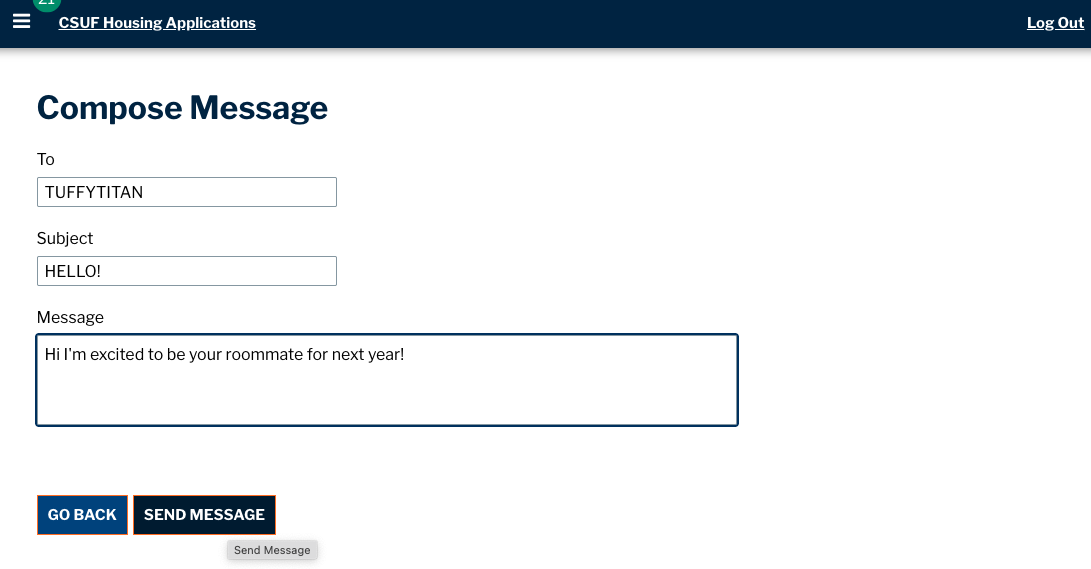
Step 4. Enter Portal Username & Message

Your roommate(s)' portal username is found on the housing portal homepage along with your booking and floor layout information. Copy the username into the "To:" line when composing the message and hit Send Message.

step4

ajax space
right col